How to sign up for Binance: phone / email + identity verification, step by step
Opening a first Binance account: what to have ready, then sign-up, ID verification and two-factor, in the order you'll actually do them.
Signing up for Binance takes three steps: create the account with an email or phone number (the invite code box is on this screen and optional); upload your ID and do the face check to complete identity verification, which Binance says is usually reviewed within 48 hours; then turn on two-factor with an authenticator app under security settings. Button labels change with redesigns, so below we mark where each step tends to trip people up.
What you need before opening a Binance account
- Check first whether it's available to you and which features you get. The products and services on offer vary by region, and some features aren't open to users in certain countries or territories. Before you start, read what the official site says for your region and you'll save yourself a wasted round.
- Bookmark the official entry. Once you're in, save it to your browser bookmarks and only ever enter via the bookmark — the simplest, most effective way to dodge phishing sites.
- An email or phone number you use. Pick one you'll reliably get codes on long-term and won't lose, since logging in and password recovery all depend on it.
- An ID document. You'll need it for the verification step, so keep it nearby rather than hunting for it midway.
- Invite code (optional): GOD166. This is the Binance code recorded by this site. Enter or confirm it during registration, and verify the official domain before submitting. You can complete sign-up without it.
Why list the invite code under "before signing up"? Because it's easiest to enter at the moment of sign-up: a new account that missed it can only bind a referrer on the Referral page within 30 days of registration, with no deposits or trades yet, no existing referral relationship and the other conditions met. A relationship that's already bound can't be changed or removed, and closing an account to re-register with a different code may get the reward cancelled. As for the discount itself, whether it applies and at what rate depends on the product, your region, your account's eligibility and the current rules. For the mechanism behind this, see what invite codes and rebates are.
Step 1: sign up by email / phone
Open the sign-up page and the flow is roughly this:
- Choose email or phone sign-up. Either works, the flow is almost identical; use the one you just prepared.
- Set a strong password. Don't reuse a password from elsewhere; a crypto account's password should be unique and strong.
- Enter the invite code (optional): GOD166. The "invite / referral code" field can be collapsed under "optional" or "expand." Enter the code, confirm the field still shows GOD166, and only then continue; you can complete sign-up without it.
- Get the code and submit. Take the verification code from your email or SMS and enter it back, and the account is created.
Invite-code note: If you decide to open a Binance account, you can use invite code GOD166 on the Binance registration page. Whether a fee discount is available, and its amount, is subject to Binance's current rules and account eligibility.
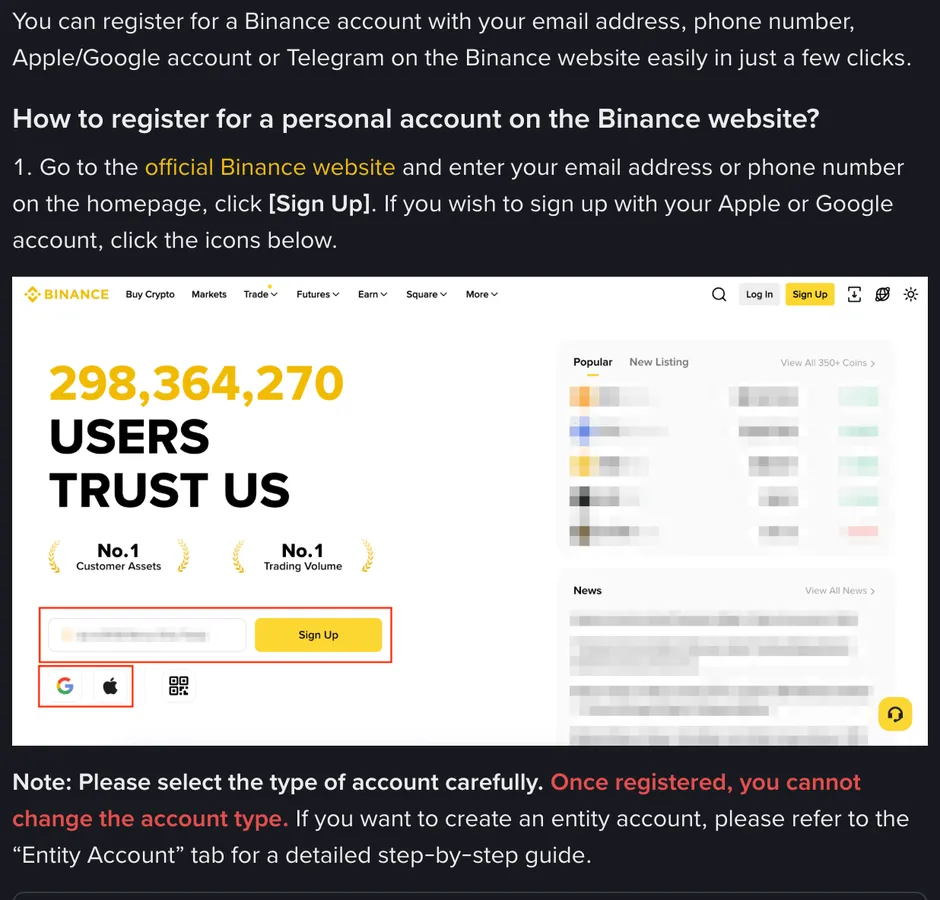
At this point you have a Binance account. But don't rush to fund it yet — there are still verification and two-factor to finish before the account is truly usable and safe.
Step 2: how to pass identity verification (KYC)
Identity verification (the industry term is KYC, "know your customer") is a standard requirement at major exchanges. On Binance, a newly registered account can't deposit or trade until standard identity verification is done; older accounts that were opened years ago and never verified are limited to withdrawals. The flow is generally:
- Fill in basic details. Name, document number and so on — fill them in truthfully and matching your document. Note that these are two separate fields: Residence, meaning the country or territory you actually live in, and the document's issuing country, meaning whoever issued that document. They don't have to be the same, so don't breeze through them as if they were one.
- Upload document photos. Follow the prompts to photograph / upload your ID; good light, all four corners in frame, no glare — and you're likely to pass first time.
- Face check. Most will ask you to do a liveness check (blink or turn your head at the camera) to prove it's you operating. For this step, take off any hat and sunglasses, don't use beauty filters, and don't refresh the page while it runs.
- Wait for review. Per the official guidance, submitted details are usually reviewed within 48 hours, though in some cases it takes longer. Be patient and don't resubmit repeatedly.
- How you know it's done. Go back to the identity verification page: if the status reads verified, this step has passed. If the status hasn't changed, it hasn't finished.
If you're rejected, don't panic and don't go looking for someone to "handle" it for you: read the rejection reason first (blurry document, corners cut off, glare, details not matching the document) and retake and re-upload accordingly. If you have questions, raise a ticket only from the official entry you bookmarked, and ignore any "support" who messages you privately. Separately, to unlock higher limits or higher-tier features the platform may additionally ask for proof of address — that's a different process and doesn't affect this step.
Safety red line: submit your documents and face check only on the exchange's official page. Anyone in a DM, a group, or posing as "support" asking you to send them your document photos or codes: block them. An exchange won't ask for your documents or verification codes in a private message.
Step 3: turn on two-factor (2FA) for safety
With the account created and verified, go straight to settings and turn on two-factor (2FA). Plenty of beginners skip this as a hassle and plant a serious risk.
Two-factor = a second lock on your account. Once on, knowing the password alone won't get you in; you also need that string of codes generated on your phone. So if your password does leak, no one can sign in on the password alone. What it can't stop is you handing the rotating code to someone else, so never forward that code to anyone.
- Prefer an authenticator app (an authenticator-type app); the codes it generates are safer than SMS codes (SMS can be hijacked).
- Be sure to back up the recovery codes / key. When setting up 2FA, copy down the recovery codes the system gives you and keep them safe. If you lose your phone, that's what lets you recover — don't treat this as a hassle.
With these three steps done — sign up, verify, two-factor — your Binance account is truly set up: usable, and able to withstand basic security risks.
After signing up, run through with small money
With the account set up, don't rush a big deposit. The steadiest way to get familiar is in this order: fund a small amount → buy a little on spot → sell it → try a withdrawal. Use money you can fully afford to lose to run the whole "how money goes in, how to buy and sell, how to take it out" loop, and you'll feel completely sure. This approach is covered in more detail in crypto basics: from zero to one.
Also, don't forget: entering the code at sign-up gives you a claim to a fee discount (whether it applies and at what rate depends on the exchange's current rules and your account's eligibility); to push fees even lower, see how are Binance fees calculated? Spot / futures rates + how to cut them. The first thing to switch on is paying fees with BNB. On a regular Binance account, spot maker and taker fees are the same rate, so placing maker orders only saves money on futures or at VIP tiers.
One last serious reminder: crypto prices are extremely volatile and you can lose all of your capital; leverage is especially dangerous, so beginners should stay away. Open an account to learn and try in small amounts, not to go all in.
A few common questions
Phone or email to sign up?
Either works, the flow is almost identical. Pick the one you'll reliably get codes on and won't lose. Invite code GOD166 is optional; if you're going to use it, enter it at sign-up — new accounts that missed it can bind within 30 days if eligible.
Is verification safe, and what do I upload?
It's a standard requirement at major exchanges; you usually upload document photos + do a face check, and note that Residence and the document's issuing country are two separate fields. Per the official guidance, review usually completes within 48 hours, though in some cases longer; what counts is the verification page's status turning to verified. Submit only on the official page, and never send documents to any support account who messages you.
Is two-factor a must?
Strongly recommended, the sooner the better. It adds a second lock, so a leaked password alone still can't sign anyone in; what it can't stop is you handing the code to someone, so never forward the rotating code. Turn it on as the first thing after signing up.
Independent editorial content from Xiaoyumi Academy, containing exchange referral (affiliate) links: we may earn a commission if you sign up and trade through our links, and any fee discount you receive depends on Binance's current rules for your region and account. This site is not the official website of Binance, OKX, Bitget, Bybit or Gate.io, and this article is not official documentation; the pages and steps follow Binance's current official version. Crypto prices are highly volatile and you can lose all of your capital, with leverage especially dangerous; this article is for educational reference only, is not investment advice, and you should decide for yourself in line with the laws of your region. If any figures are updated, you'll see it in the corrections log.