Is exchange identity verification (KYC) safe? Why it's required and how to protect your documents
Asked to upload your ID and do a face check when signing up, many beginners hesitate: is exchange identity verification safe? Below: what KYC really is, why major platforms require it, whether verifying with a reputable exchange is a controllable risk, and how to protect your ID details. Only the legitimate route is covered here, with no ways around verification.
With a major compliant exchange, the risk of verifying comes down mostly to where you submit and who gets your documents: submit only through the official entry you saved yourself and never give your ID to a third party, and you've blocked most of it. The platform itself being breached, or your data being lawfully requested, is the part you can't control.
What KYC is, and why major exchanges require it
KYC stands for Know Your Customer — a platform's process to verify your real identity: upload ID documents, fill in true information, and sometimes add a face check to confirm "person and document match". In the exchange context, this step is usually called "identity verification".
So why do nearly all major exchanges require it? The core is compliance:
- Anti-money-laundering and counter-terrorist financing. Global financial regulators broadly require platforms to verify users' identities to prevent funds being used for money laundering, fraud, terrorist financing and other illegal purposes. KYC is the foundational action implementing this — not a platform wanting extra info, but a hard requirement at the regulatory level.
- A prerequisite for a platform to operate legally. To run compliantly in various places, a reputable exchange must follow local identity-verification rules. Doing KYC is precisely a sign that a platform "operates properly and is bound by regulation" — it's doing the compliance it should.
- Protecting users themselves. Identity verification also helps you: it makes an account harder to impersonate, and provides a basis for withdrawing and recovering accounts. A platform where anyone can do anything anonymously is actually more dangerous for ordinary users.
So "to verify or not" basically isn't a choice for a major compliant platform — it's standard industry practice. What's truly worth your attention is how to protect your information while verifying. If you haven't picked a platform and want to compare, see how to choose an exchange, prioritizing large, compliant, well-regarded ones.
Handing your ID to an exchange: where the risk actually is
Verifying with a reputable, compliant major exchange is a relatively controllable risk — which is not the same as no risk. A few reasons:
- Big exchanges have mature data-protection mechanisms. Leading compliant platforms generally use encrypted storage, access isolation and similar measures for user identity data, treating it as a core compliance asset they can't afford to leak.
- Verification is a regulated compliance action. A reputable platform collects this info for clear, constrained compliance purposes, not to handle however it likes — fundamentally different from a sketchy site of unknown origin asking for your documents.
But this doesn't mean "upload with your eyes shut". Be clear: the real risk often comes not from a legitimate platform itself, but from the scenarios below —
- Handing documents to a third party. Someone offering to "verify for you" or "get you through KYC" takes your document photos — handing your identity over, extremely dangerous (and often involving rule-breaking).
- Uploading on a non-official page. Phishing sites and fake apps imitate the official one, tricking you into uploading documents and doing a face check there, where your info falls into scammers' hands.
- An insecure device or account. A compromised phone or a stolen account can also expose info you've already submitted.
Safety depends largely on "where and to whom you submit", not just on "verification itself". Submitting from the official entry you saved yourself brings down the risk of handing your details to a spoofed page; but it doesn't remove the platform's own risk (it can be breached, its database can leak, and competent authorities can lawfully request the data), and it won't stop your account being taken over. So before you submit anything, give the privacy notice a minute and look for four things: which legal entity you're contracting with, what the document data is used for, which third parties it's passed to for processing, and whether you can request deletion.
How to protect your ID details
Verification is unavoidable, but you can absolutely keep the risk minimal. Do these:
- Only operate through official channels. Download the app from the official website or official app store, and do verification only on the platform's official pages. Anything jumping you off via an unfamiliar link, DM or QR code to upload documents — don't touch it.
- Never hand documents to any third party. There's no safe-and-compliant "get someone to verify for you". Anyone asking you to send your ID photo, a holding-ID photo or a face video to "support / an intermediary / someone who'll get you approved" — refuse.
- Check the URL, confirm the official domain. Before uploading sensitive material, confirm the browser's address bar is the platform's genuine official domain, not a similarly spelled imitation. One letter off may be a phishing site.
- Add a necessary watermark to ID photos (where the platform allows). If some scenario needs an ID photo provided outside the platform (such as a particular appeal), consider adding a "for XX use only" watermark to lower the risk of misuse — but the platform's official verification flow usually doesn't need this, so follow the platform's guidance.
- Set up account security itself. Use a strong password and turn on two-factor (2FA), so a stolen account doesn't also expose submitted info. Account security is the outer layer protecting your documents.
- Beware of "verification anomaly / re-verify" phishing. An SMS or email saying "your verification has a problem, click the link to re-verify" is most likely phishing. Open the official app and check yourself; don't click the link.
- Read the privacy notice before you submit. Four concrete things: which legal entity you're contracting with, what the document data is used for, which third parties it's passed to for processing, and whether you can request deletion.
Put these into practice and the risk is squeezed down to what's actually in your hands; the part that's left — the platform itself being compromised, or data being lawfully requested — isn't yours to control. It's two sides of the same coin as keeping a seed phrase: platform data relies on official channels and account protection, on-chain assets rely on your own safekeeping of the seed phrase and private key, and you need both.
Can you use it without verifying, and what limits apply
Many people ask: can I use it without verifying? On most compliant exchanges, the answer is without verification you often can't use the core features fully, or at all. Common limits include:
- No deposits / withdrawals. Fiat deposits, P2P trades, and withdrawing to a bank — features involving money in and out — usually require verification first.
- Very low or restricted withdrawal limits. An unverified account's withdrawal limit is often kept very low, or withdrawals are blocked outright, easily leaving assets stuck in the account.
- Some trading and product features unavailable. Many features open only after verification by default.
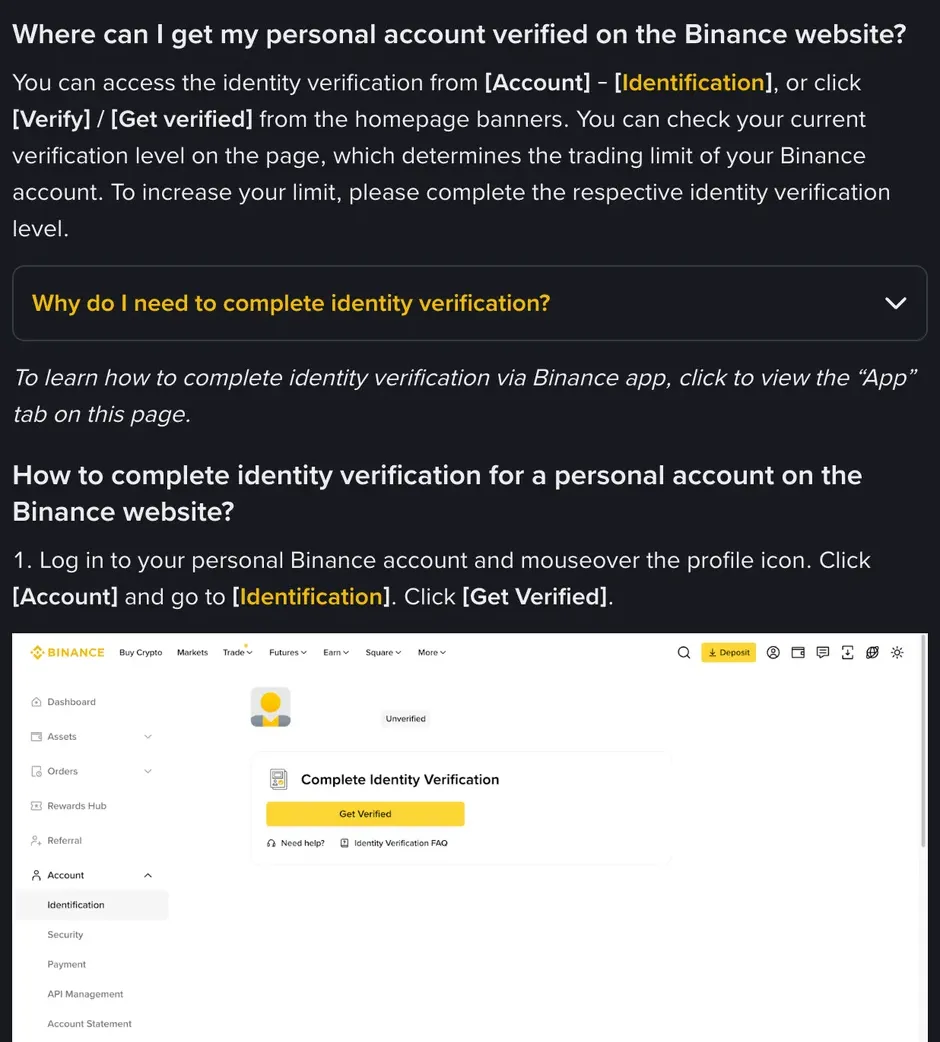
Take Binance: a newly registered account can't deposit or trade until standard identity verification is complete, and older accounts opened years ago that were never verified are limited to withdrawals.
So realistically, since you plan to use an exchange properly and need to deposit and withdraw, verification basically can't be skipped. Rather than agonizing over avoiding it, do it well through official channels and protect your documents.
Paying someone to verify for you, forging documents, or borrowing, buying or selling someone else's identity to register can get the account banned at any time, and may also break the law.
A few common questions
Is exchange verification safe?
With a reputable, compliant major exchange the risk is relatively controllable, but not zero: big exchanges have mature data encryption and protection, and verification is itself a compliance requirement. Most of the risk comes from handing documents to a third party, uploading on a non-official page, or being phished — all of which you can avoid; what you can't avoid is the platform being breached or the data being lawfully requested. Before submitting, read the privacy notice: which entity you're contracting with, what the data is used for, which third parties it goes to, and whether you can request deletion.
Does an exchange require verification, and what is KYC?
KYC stands for Know Your Customer: the process of verifying a user's real identity. For anti-money-laundering and similar compliance, major compliant exchanges generally require it; it's standard practice and a prerequisite for legal operation.
Can I use an exchange without verifying?
On most compliant exchanges, not verifying brings clear limits: no deposits, very low withdrawal limits, some features unavailable — often the core features can't be used. On Binance, a new account can't deposit or trade without standard identity verification; older accounts that were never verified are limited to withdrawals.
This is independent editorial content from Xiaoyumi Academy. This page has no exchange referral links. Some other guides on this site do; whether signing up and trading through one of those links gets you a fee discount, and how much, depends on the exchange's current rules and your account's eligibility. This site is not the official website of Binance, OKX, Bitget, Bybit or Gate.io. Crypto prices are highly volatile and you can lose all of your capital; this article is for educational reference only and is not investment or legal advice — complete identity verification through the exchange's official channels and decide for yourself in line with the laws of your region. If any figures are updated, you'll see it in the corrections log.