OKX sign-up guide: beginner setup + buying USDT by P2P, end to end
This one is for anyone using OKX for the first time: how to sign up, whether to verify, how to turn local currency into USDT by P2P, and how to open its built-in Web3 wallet. Every step is written in the real order — just tap along.
A lot of beginners pick OKX (formerly OKEx) as their first exchange for solid reasons: a clean, easy-to-follow interface, and the fact that it builds trading and a Web3 wallet into one app, so if you want to touch on-chain things later you don't need to install anything else. Below, the steps run in the order you'll meet them: sign up — verify — buy your first USDT — open the wallet.
Who OKX suits
If you want to keep things low-friction, OKX is an easy starting point: the interface and help docs are complete, and the button labels are easy to follow.
Another plus is the built-in Web3 wallet. On other exchanges, if you want to go on-chain and connect to decentralized apps, you'd install a separate wallet and copy down a seed phrase yourself; OKX embeds that wallet in the same app, with guided creation and backup inside, making the transition smoother for beginners. Of course, the exchange account and the Web3 wallet are two different things, which we'll cover separately below.
How to sign up for OKX (with the invite code)
Signing up itself is quick, on phone or web. The flow is roughly:
- Use the official entry point. Use your own bookmark or verify OKX's official domain before visiting; do not follow links forwarded in DMs, groups or by strangers.
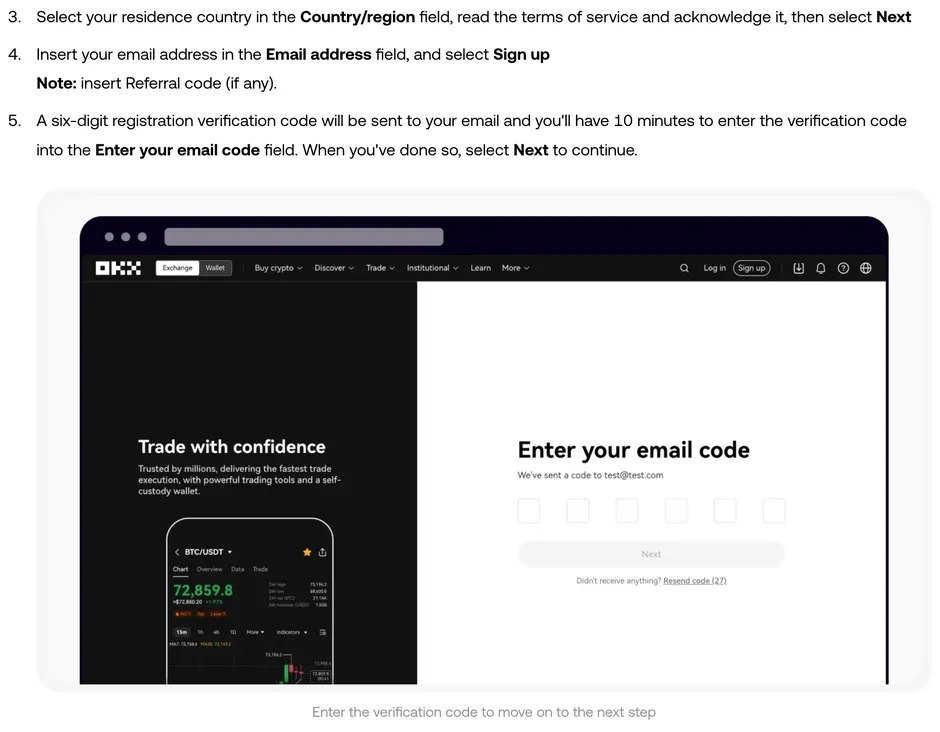
- Choose your country or region of residence. Pick where you actually live; the ID you use for verification later has to match it.
- Enter your email, and invite code GOD166 in the same step. The invite code goes in at the email step: the sign-up page usually has an "invite / referral code" box, sometimes only appearing after you tap "show more". Enter GOD166; this step binds the referral relationship, which carries a fee discount — whether it applies and at what rate depends on the exchange's current rules and your account's eligibility. It basically can't be added once the account exists, so don't miss it. After that, activate with the verification code, add your phone number when prompted, and set a strong password.
- Set up security. Beyond the login password, turn on two-factor (2FA) while you're at it; it makes withdrawing smoother later.
How to pass identity verification
Verification requirements depend on your country or region, account and the feature you want to use. Open "Identity verification" in your account and follow the level, document and status shown there rather than assuming one tier covers every use.
Choose your actual country or region and submit the documents and liveness check requested on screen. Requirements and review status can change or require additional information, so monitor the verification page and respond there if OKX asks for another step. Always use your own identity details.
How to buy USDT by P2P
The most common way for a beginner to turn local currency into USDT is P2P (peer to peer); check first whether P2P is open in your country or region. The platform matches you with a seller, you pay them, and their USDT is locked first by the platform and released only after you've paid. What the platform holds in escrow is that USDT; the local currency goes straight from you into the seller's receiving account. The whole thing runs inside the platform's order, not as a private transfer.
- Go to "Buy → P2P", choose "Buy", and pick USDT as the coin.
- Pick a seller from the list. Choosing the seller matters more than chasing the rate: favour ones with many trades and a high positive rating, even if the price is a little higher; then check the limits suit you and choose a payment method that's convenient.
- Enter the amount you want to buy and place the order. The system shows the payment account the seller specifies.
- Using an account in your own verified name, transfer the money per those payment details; fill in the transfer note the way the order page asks, and make sure the amount matches the order.
- After transferring, tap "I've paid". Once the seller confirms receipt and releases, the USDT lands in your account.
One iron rule: only follow the platform's flow, and never accept private transfers outside it. Anyone who asks you to add them on a messaging app, or says the platform's too slow so they'll give you a better price privately, is most likely a trap — outside the platform's order, if you pay and they don't release, you don't even have evidence to file a dispute with. The reverse also holds: if you've paid inside the order and the seller drags on releasing, don't cancel the order — keep the transfer receipt and file a dispute straight away.
How to use the built-in Web3 wallet
The OKX app has a separate section called "Web3 wallet", and it's not the same thing as the exchange account above: coins in the exchange account are held by the platform, while coins in the Web3 wallet are controlled by you via a seed phrase. It's important for beginners to keep these straight.
To set it up, tap "Web3 wallet → Create wallet" in the app, and the system generates a seed phrase. This phrase is the wallet's only key — write it on paper, keep it safe, and never screenshot it, upload it to the cloud, or send it to anyone. Whoever has this phrase can move all the coins inside, and on-chain transfers are irreversible. As a beginner, keep only a tiny amount in the wallet to feel out the flow, and scale up once you're comfortable.
To move USDT from the exchange account into the Web3 wallet, in "Withdraw" choose "on-chain withdrawal to your own Web3 wallet", and be sure to match the chain (network) — pick the wrong one and the coins may be unrecoverable. Beginners tend to panic here, so test with a small amount first and add more once it arrives.
A few security habits
Stick to your bookmark. Only go in through the official entry you've checked and saved as a bookmark; any "support" or "unfreeze link" popping up in DMs or search ads is basically phishing.
Turn on two-factor. A password alone isn't enough; with 2FA on, logging in and withdrawing have an extra gate.
Don't touch futures yet. OKX's futures and leverage are slick, but for a beginner, leverage can take your capital to zero in minutes and you can lose all of your capital. Get comfortable with spot (buying and selling coins directly) first. To understand how to pick a major exchange, start with our crypto basics.
Common questions
Does OKX sign-up require verification?
Verification requirements depend on your country or region, account and the feature you want to use. Open Identity verification in your account and follow the level, documents and status shown there. Completing one check does not guarantee that every deposit, purchase, withdrawal or trading feature will be available; product access and further review may still apply.
Is buying USDT by P2P safe?
The platform matches you and holds the seller's USDT in escrow; the local currency goes straight from you into their account. Pick high-volume, highly rated sellers, stay inside the order and don't transfer privately, and the chance of trouble drops. If you've paid and they won't release, don't cancel the order — file a dispute with your transfer receipt.
Are OKX and OKEx the same?
Same exchange. OKX is the current name; OKEx is the former name.
This is independent editorial content from Xiaoyumi Academy. This page has no exchange referral links. Some other guides on this site do; whether signing up and trading through one of those links gets you a fee discount, and how much, depends on the exchange's current rules and your account's eligibility. This site is not the official website of OKX. Crypto prices are highly volatile and you can lose all of your capital; this article is for educational reference only, is not investment advice, and you should decide for yourself in line with the laws of your region. If any figures are updated, you'll see it in the corrections log.