What is a trading pair? The two coins around the slash, and the fee you pay twice
Can't make sense of BTC/USDT or ETH/BTC, and then a swap into some small coin charges you a fee twice? This guide covers what each side of the slash is, how to read the price and the buy/sell direction, then works a hypothetical example through both fees of a two-step swap.
In a pair written BTC/USDT, the coin in front of the slash is the one you are buying or selling, and the coin after it is what prices that coin: the one you hand over, or the one you get back. So the price sitting next to BTC/USDT reads as one BTC is worth this many USDT.
When there is no direct pair between the coin you want and the coin you are holding, you have to swap into an in-between coin first, then use that to buy what you actually wanted. Those are two separate trades, and each one is charged a fee. Whenever someone asks why swapping into a small coin cost them a fee twice, the answer is usually sitting right there in their trade history. Below: how to read a pair, which way buy and sell go, and what that second fee actually costs. Fee figures in this guide were checked in September 2026.
- The coin before the slash is what you trade, the coin after it prices it
- That number on screen: a ratio of what to what
- Same pair: what buy and sell actually swap
- OKX's USDⓈ, USDT and CRYPTO zones
- No direct pair: two steps, two trades, two fees
- Even inside one exchange, rates differ from pair to pair
- A few common questions
The coin before the slash is what you trade, the coin after it prices it
Exchanges use different words for the same two things. The Binance help center's guide to spot trading splits a pair into a base asset and a quote asset: the base asset is the first coin in the pair, the one you are buying or selling, and the quote asset is the second one, the coin its price is quoted in. Its example is BNB/BTC, where BNB is the base asset and BTC is the quote asset.
OKX Learn uses its own pair of words. Its glossary entry is published in Chinese only; translated, its two terms are the currency of transaction and the currency of account. Its example is ETH/BTC: ETH is the one being traded, BTC is the one doing the pricing. In everyday English you will also hear them called the base currency and the quote currency.
| Whose term | Before the slash | After the slash | Example in their own doc |
|---|---|---|---|
| Binance | Base asset | Quote asset | BNB/BTC |
| OKX | Currency of transaction | Currency of account | ETH/BTC |
| Plain English, as used here | The coin you buy or sell | The coin that prices it, the one you pay with or get back | BTC/USDT |
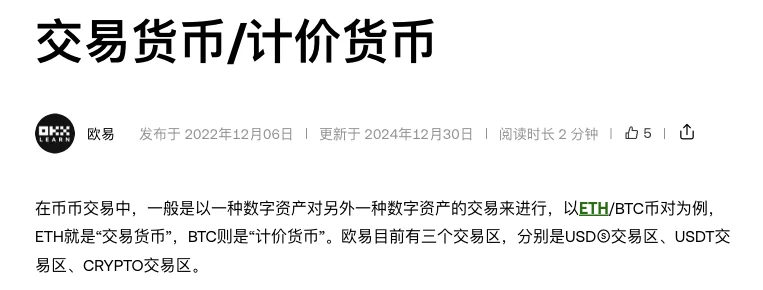
Both examples put BTC on the right-hand side, and that is worth a second look: the coin after the slash does not have to be a stablecoin like USDT, because BTC can price a pair too. The common beginner assumption is that whatever sits after the slash is basically dollars, and then ETH/BTC shows a price of 0.0-something and it looks alarming.
Some interfaces drop the slash for a hyphen, or run the two tickers together with nothing between them. You read them the same way: the first one is the coin being traded. And this guide is only about spot pairs. Futures are a different machine, so if the two blur together for you, start with spot vs futures: what's the difference, and which should a beginner trade.
That number on screen: a ratio of what to what
The price always means one unit of the coin before the slash is worth this many of the coin after it. The round numbers below are invented so the arithmetic is easy to follow, and they are not quotes:
| Pair | Number on screen (hypothetical) | Reads as | Roughly, in USDT |
|---|---|---|---|
| BTC/USDT | 100,000 | 1 BTC = 100,000 USDT | 100,000 USDT |
| ETH/BTC | 0.03 | 1 ETH = 0.03 BTC | 0.03 × 100,000 = 3,000 USDT |
The second row is how a coin-priced pair converts: read off how many BTC one ETH is worth, then multiply by whatever BTC is doing on BTC/USDT. That 3,000 is only a ballpark. ETH/BTC and BTC/USDT are two separate markets with their own order flow, and the two prices do not line up to the decimal at every moment.
The Binance spot trading FAQ has a ready-made example of the same reading: on BTC/USDC, with BTC at a market price of 65,000 USDC, someone who wants in at 63,000 uses a limit order. Those are demo numbers written for a help document rather than quotes, but they read exactly as above: 65,000 is the price of one BTC, denominated in USDC.
One aside: the price you actually fill at also depends on how much is resting in the order book at that moment. When the book is thin, a slightly larger order walks up or down to prices further from the number on screen.
Same pair: what buy and sell actually swap
Direction is always about the coin in front of the slash. Buy means spending the coin after the slash to get the coin before it. Sell means handing over the coin before the slash to get the coin after it back.
| Pair | Action | You spend | You receive |
|---|---|---|---|
| BTC/USDT | Buy | USDT | BTC |
| BTC/USDT | Sell | BTC | USDT |
| ETH/BTC | Buy | BTC | ETH |
| ETH/BTC | Sell | ETH | BTC |
When the Binance FAQ walks through placing an order it uses BTC/USDC: you fill in a price and a quantity, and the order button names the coin, buy BTC. Naming the coin in front of the slash is the interface telling you what this order brings back. The percentage row under the quantity field is, the FAQ explains, a share of your total assets; the default funding source may draw on spot, funding and earn balances where those apply, and the available-balance control lets you pick.
The last two rows of the table are where people get stuck. If all you hold is USDT, opening ETH/BTC and tapping buy shows you no BTC to pay with, because this pair wants BTC. Nothing is broken; you are just on the wrong pair.
On Binance the fee comes out of the coin you receive. Its FAQ on how spot trading fees are calculated puts it plainly: the fee is always charged in the asset you end up with, so buying on ETH/USDC means it is taken in ETH and selling means it is taken in USDC. The ETH that lands in your account is therefore a little short of the quantity you typed, and the arithmetic in the next section follows the same rule.
OKX's USDⓈ, USDT and CRYPTO zones
After laying out those two terms, the OKX Learn glossary entry adds a line: OKX currently runs three trading zones, the USDⓈ zone, the USDT zone and the CRYPTO zone. That is the passage in the screenshot earlier in this guide.
The entry says the three zones exist; it does not say what the split is based on. Going by the names, it is most likely the quote currency after the slash, so that pairs in the USDT zone are priced in USDT and pairs in the CRYPTO zone are priced in crypto. That is my inference from the names, not something the entry states. Which quote currencies the USDⓈ zone covers I could not find spelled out, so I will not define it on their behalf.
The split is useful when you are hunting for a coin. Not finding it in the USDT zone does not necessarily mean the exchange has not listed it, because it may be listed only in another zone, priced in another coin. Look in the other zones first, then decide whether you need the two-step route in the next section.
That entry was published in December 2022 and last updated in December 2024. What the zones are called and where they sit in the app is whatever you see when you open it.
No direct pair: two steps, two trades, two fees
Say you hold USDT and you want a coin, call it A. Nothing in the USDT zone offers A/USDT; the only pair is A/BTC. That leaves two steps:
- On BTC/USDT, buy BTC: spend USDT, receive BTC;
- On A/BTC, buy A: spend BTC, receive A.
The first line of the Binance fee FAQ is that every successful trade carries a trading fee. Two steps are two trades, charged once each. Before the arithmetic, the inputs:
- 1,000 USDT to start;
- a rate of 0.1%, which is the spot maker and taker rate for a regular user on the Binance fee page;
- the fee taken out of the coin received, following the Binance FAQ;
- BTC/USDT at 100,000 and A/BTC at 0.00001, so one A is worth about 1 USDT, with prices holding still between the two steps.
| Step | You spend | Due at that price | Fee (0.1%, taken from the coin received) | Actually received |
|---|---|---|---|---|
| Step 1, buy on BTC/USDT | 1,000 USDT | 1,000 ÷ 100,000 = 0.01 BTC | 0.01 × 0.1% = 0.00001 BTC | 0.00999 BTC |
| Step 2, buy on A/BTC | 0.00999 BTC | 0.00999 ÷ 0.00001 = 999 A | 999 × 0.1% = 0.999 A | 998.001 A |
For comparison: if A/USDT existed at the same price of 1, then 1,000 USDT would buy 1,000 A in a single step, less 1 A in fees, so 999 A lands. The two-step route lands 998.001 A. The missing 0.999 A is exactly the second step's fee.
Converted into USDT it is easier to see: the first step's fee of 0.00001 BTC is about 1 USDT, the second step's 0.999 A is about 0.999 USDT, so roughly 2 USDT between them, against 1 USDT for a direct swap. The formula is simple enough, because each step leaves you with spend ÷ price × (1 − fee rate), and doing that twice multiplies your starting amount by (1 − 0.1%) twice: at about 1 USDT per A, 1,000 × 0.999 × 0.999 = 998.001.
Two more things make real trades come out slightly worse than this table: the price moves between the steps, and neither step necessarily fills at exactly the number on screen. Neither can be worked out in advance, which is why the table shows fees only.
It works the same going back. Turning A into USDT later means selling into BTC first and then into USDT, two trades again. Some platforms offer a one-tap convert feature; before you use it, read on the page itself how it charges, then compare that with the two fees above. And if you are moving the coin off the platform afterwards, the withdrawal fee is a separate bill: see how to cut your USDT withdrawal fee: TRC20 / ERC20 / BEP20 compared.
Even inside one exchange, rates differ from pair to pair
The 0.1% above is a working figure for the arithmetic, not a number that applies to every pair. For accuracy, go to each exchange's own fee page.
On the Binance spot fee page, a regular user pays 0.1000% as both maker and taker, or 0.0750% when fees are paid with BNB. Rates change with VIP level; as a beginner, read the regular-user row. Availability is worth checking at the same time, since binance.com does not serve every country and the United States is the best-known exclusion. Check the Binance terms of use to see whether your country is restricted before you plan around these rates.
OKX published a notice on consolidating token pair fee groups on 30 July 2026: effective 14 August 2026, 15:00 to 17:00 (UTC+8), spot pairs in Group 2 and Group 3 have their rates aligned to Group 1. On the adjusted table, a regular user pays 0.0800% as maker and 0.1000% as taker on spot.
One line in the same notice is worth remembering more than the rates are: fiat-quoted pairs, zero-fee pairs, stablecoin and other spot pair groups keep their existing rules and are not affected by this change. In other words, several kinds of OKX spot pair still do not follow the ordinary group's rate. What each of them charges I have not verified, so do not assume 0.1% and do not assume free either. The notice also states that pairs are listed and delisted on an ongoing basis, that the most up-to-date applicable fee schedule is the one published through OpenAPI or on okx.com/fees, and that not all pairs are available in all jurisdictions.
As for why OKX charges 0.08% to makers and 0.1% to takers in the first place, that is a separate question, covered in what are maker and taker orders? A must-know for saving on fees. Back to the two-step swap: checking which tier each of your two pairs falls into before you order beats reconstructing it from your trade history afterwards.
A few common questions
What does trading pair mean?
A trading pair is two assets on an exchange that can be traded against each other, written like BTC/USDT. The coin before the slash is the one you buy or sell: Binance calls it the base asset, OKX the currency of transaction. The coin after the slash is the one that prices it: Binance's quote asset, OKX's currency of account.
How do I read the price shown on BTC/USDT?
It reads as one BTC is worth this many USDT. On a coin-priced pair such as ETH/BTC, the number is how many BTC one ETH is worth; multiply that by the BTC/USDT price and you get a rough value in USDT.
On ETH/BTC, what am I spending when I tap buy?
You spend BTC and get ETH back. Buying always means spending the coin after the slash to get the coin before it, and selling is the reverse. If all you hold is USDT, you cannot buy on this pair at all.
How do I buy a coin that has no USDT pair?
First check whether it is listed against some other quote currency, say A/BTC. If it is, it takes two steps: buy BTC with USDT on BTC/USDT, then buy A with BTC on A/BTC. Two steps are two trades, each charged a fee, and the price can move in between.
Why was I charged a fee twice on one swap?
Because you made two trades. Every successful trade carries a fee, and the hop through the in-between coin counts as one of them. At a 0.1% rate, with prices held still, two steps land roughly your starting amount multiplied by (1 − 0.1%) twice, which is about one extra fee compared with a direct swap.
This is independent editorial content from Xiaoyumi Academy. This page has no exchange referral direct links; where another guide on this site does contain one, we may earn a commission if you sign up and trade through our links, and any fee discount you receive depends on the exchange's current rules for your region and account — affiliate commission is how this site is funded and it doesn't shape our judgment. This site is not the official website of Binance, OKX, Bitget, Bybit or Gate. Every price in this guide is a hypothetical example rather than a quote; pairs, trading zones and fee rates all get adjusted, so the current page of the platform you use is what counts. Crypto prices are highly volatile and you can lose all of your capital; this article is for educational reference only, is not investment advice, and you should decide for yourself in line with the laws of your region. If any figures are updated, you'll see it in the corrections log.